
Coospo CS500 GPS Cycling Computer Review

By Brandon Bilyeu


Hot!
- Price
- Long battery life
- Bluetooth and ANT+
- Quick sensor/GPS connections and no dropouts
- Good navigation
- USB-C
- Garmin compatible mount
- IPX7 waterproof
Not!
- Manual trainer control requires lots of button clicks to change power
- GPS file import not streamlined with route creation apps, imported ride names are gibberish
Price: $90
Size: 85mm x 53mm x 19mm (3.3” x 2.1” x 0.75”)
Screen Size: 66mm (2.6”) diagonal LCD
Weight: 72g
Connectivity: Bluetooth and ANT+
USB Connection: USB-C
Battery Life: ~45 hours
How obtained: review sample from Coospo
Available: Coospo and Amazon
Website: Coospo CS500 Amazon CS500
RBR Sponsor: no
Tested: 80+ hours
Coospo’s First Cycling Computer with Navigation
Coospo is a Chinese exercise technology company that was founded in 2014. Their first product was the Coospo fitness app, but they quickly moved on to hardware in 2016 with GPS cycling computers, heart rate monitors, and cycling speed/cadence sensors. While they have an existing lineup of cycling computers, this summer they released their first navigation enabled computer.
The CS500 supports breadcrumb navigation (no base maps) and as far as I can tell it is the cheapest cycling computer available with turn-by-turn navigation. It also supports any sensor you can think of, can control an indoor trainer, and as I write this a software update has been released that adds support for Workouts.
In The Box
The CS500 comes with a USB-C to USB-A charging cable, screen protector, safety lanyard, Garmin style mount with rubber bands, and a user manual. As with most computers these days if you want an out-front mount you have to purchase it separately. See the end of this CS500 review for a quick review of Coospo’s excellent and affordable out-front mount.

CS500 – Quality Hardware
The CS500 is a medium sized computer with a 2.6-inch (66cm) screen that makes the data easy to read without looking like you have a tablet strapped to your handlebars. The black and white display is simple but crisp and an ambient light sensor makes sure it’s always visible. This is not a touchscreen device, so all commands are entered via six buttons (clockwise from top left):
- Back/Power
- Enter/Select
- Scroll Up
- Scroll Down
- Start/Pause
- Lap

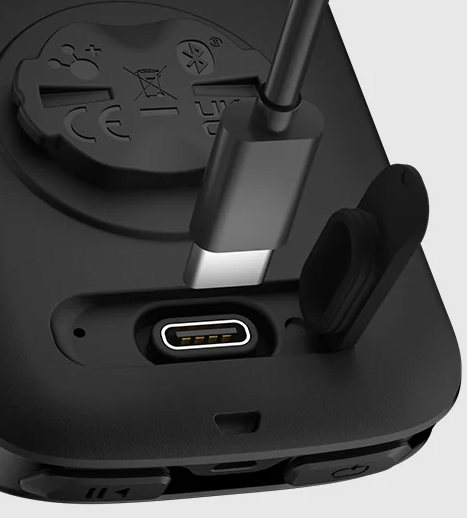
The buttons give good tactile and audible ‘beep’ feedback and are large enough for use with big fingers and gloves. On the back of the device is a Garmin compatible quarter-turn mount and the USB-C charging port. An IPX7 rating allows riding in the rain without any worries. Overall, the black plastic enclosure looks clean and high quality.
Settings and Setup
You can set up the CS500 on device or using the CoospoRide app on your phone. The menu structure reminds me of Garmin, which means there are lots of options and it can be a little hard to find what you are looking for. But if you are like me then you just go through every setting once and then never touch it again. Some of the highlights include:
- Pair sensors via ANT+ or Bluetooth (heart rate, speed, cadence, power, trainer, radar)
- Set up different ride profiles with custom screen layouts (over 140 data types to choose from), alarms, and GPS profiles
- Input your height/weight/age and HR/Power zones
- Adjust system settings like backlight, power management, calibrate the GPS, select units and tones, update time and language
- Allow USB connection to a computer for data transfer
Navigation
The CS500 uses breadcrumb navigation with a single route line on the screen and no basemap. The lack of a basemap makes for an easy-to-read display, but also lacks detail that could be helpful at confusing intersections. The real bonus to breadcrumb navigation is excellent battery life since the computer doesn’t have to constantly refresh a map.
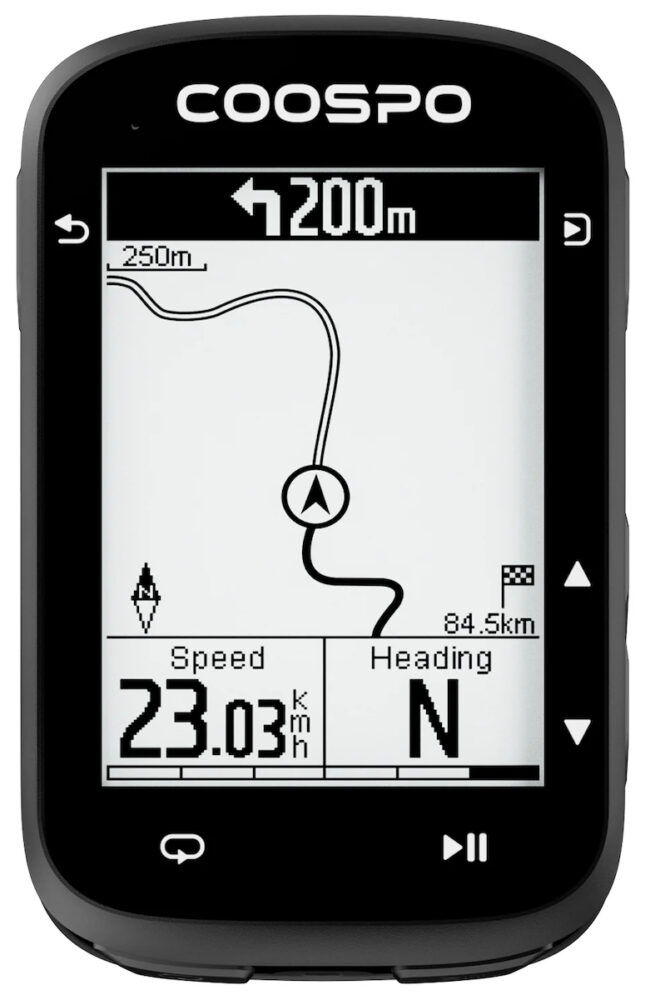
The navigation screen shows your planned route as a hollow line and where you have already been as a solid black line. The interface here is uncomplicated with no zoom options or rerouting. If you go off course it will ‘beep’ at you and an ‘off course’ banner will appear. For upcoming turns, 200m before the turn a ‘beep’ sounds and a banner will appear on the top of whatever page you are on. The banner will indicate the turn direction and a distance to turn countdown from 200m to 0m.
This was my first time using breadcrumb navigation and I was worried it would be hard to stay on course without a basemap showing road details, but it works very well in the city and countryside. The few times I made a wrong turn at complicated intersections it was quick to inform me and I was easily able to get back on track.
Loading a route is not quite as streamlined as other computers, but it’s just a couple extra steps. You must manually download a GPS file from your preferred route creating software/app and then upload to the CS500 via the CoospoRide app or with the USB-C connection to the CS500. A bigger annoyance is that the uploaded files lose any name you have specified and are listed on the CS500 with a random numerical digits name, for example ‘4644_125298’. This makes it hard to find the route you want from the list of all your uploaded routes.
Sensors and Data
The CS500 supports a wide range of sensors that broadcast in Bluetooth or ANT+. This includes Speed, Cadence, Heart Rate, Power, and Radar. Nine pages can be configured with over 140 different data types, including numerical and graphical readouts.
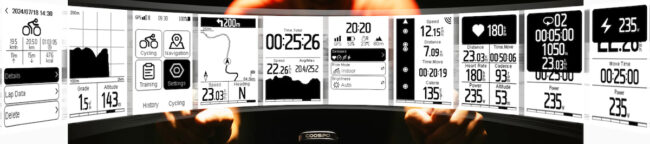
You can also connect to a smart trainer to control resistance by setting a power target, grade, or resistance level. It controlled my trainer well, holding a very steady power, but changing the power target is painful. It requires you to go into the ride menu, click down to the power target setting, then change each digit of the 3-digit power number by single digits per click. This could be up to twenty clicks every time you want to change power.
Battery Life
Coospo claims up to 45 hours of battery life, but they don’t state what settings, sensors, and features were in use to arrive at this figure. For my testing I kept the backlight on with the ambient sensor in control, always had heart rate and cadence sensors connected, had the GPS set to use GPS+GAL+GLO+QZSS, and used navigation about 50% of the time. I got around 35 hours out of one charge, but could likely come much closer to 45 hours by limiting the backlight and using fewer GPS constellations. And since the navigation does not use base maps I would expect 100% navigation use to have only a small impact on battery life.
Future Updates
As I was writing up this review Coospo launched an update for the CS500 that included support for training plans/workouts. This includes the ability to create workouts on the CoospoRide App or import from TrainingPeaks. This allows the CS500 to give you workout prompts for intervals with targets and duration automatically taken care of so you just have to ride at the prescribed power or heart rate. I have not had time to test out this new feature, but will provide an update after some testing.

It will be interesting to see what other features Coospo adds in the future. The CS500 has most of the features found in many of today’s mainstream computers so it is probably a good guess that data analytics might be coming next.
Bottom Line
The Coospo CS500 flawlessly tracks your rides via multiple GPS constellations and records data from all your sensors. A long battery life makes it easy to live with. Turn-by-turn navigation is excellent and a standout feature at this price point. There are a few rough edges that I expect to be ironed out in future software releases, but overall, this is a fully functional cycling computer that I can recommend. If you can’t swallow the big price tags of the mainstream brand computers, then the Coospo CS500 is worth a look.
Quick Review
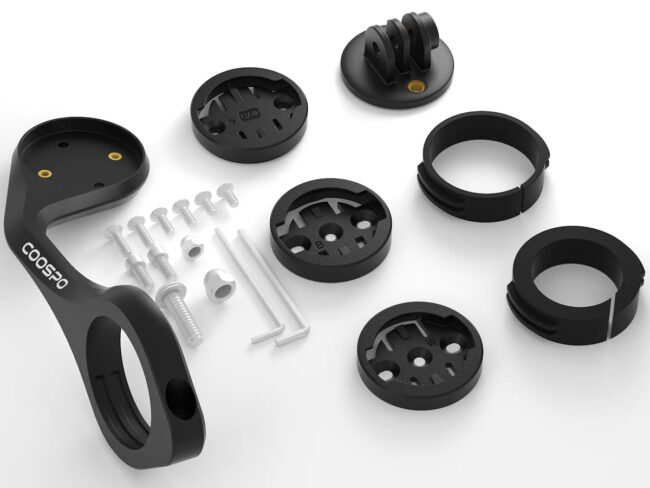
The Coospo Out Front Mount is a very stiff plastic handlebar mount for your bike computer and is long enough to accommodate even the biggest Garmin units. It has swappable inserts to make it compatible with Coospo/Garmin, Wahoo, and Bryton computers. It also comes with a Go-Pro style mount for the underside to hold a camera or light. I have used the mount with both the Coospo CS500 and my Garmin computer and it works perfectly. The best part is the price. At $16 it is easily 2-3 times cheaper than most other options.
Brandon Bilyeu is an avid recreational roadie who lives in Regensburg, Germany. He’s a year-round bike commuter and is a mechanical design engineer by trade. Click to read Brandon’s full bio.

Does this device provide audio cues for turns via the app?
Hi Gen,
The CS500 emits a ‘beep’ audio cue for turns. All the navigation is done on the CS500, during navigation there is no active connection to the CoospoRide app.
-Brandon
thanks.
The gibberish file name for route issue was fixed as of at least the end of October. I was pleasantly surprised to see the name I typed show up on the device.
Also, there is a zoom feature in the map with a few different zoom levels. I don’t remember which button it is offhand.